



Core Concept
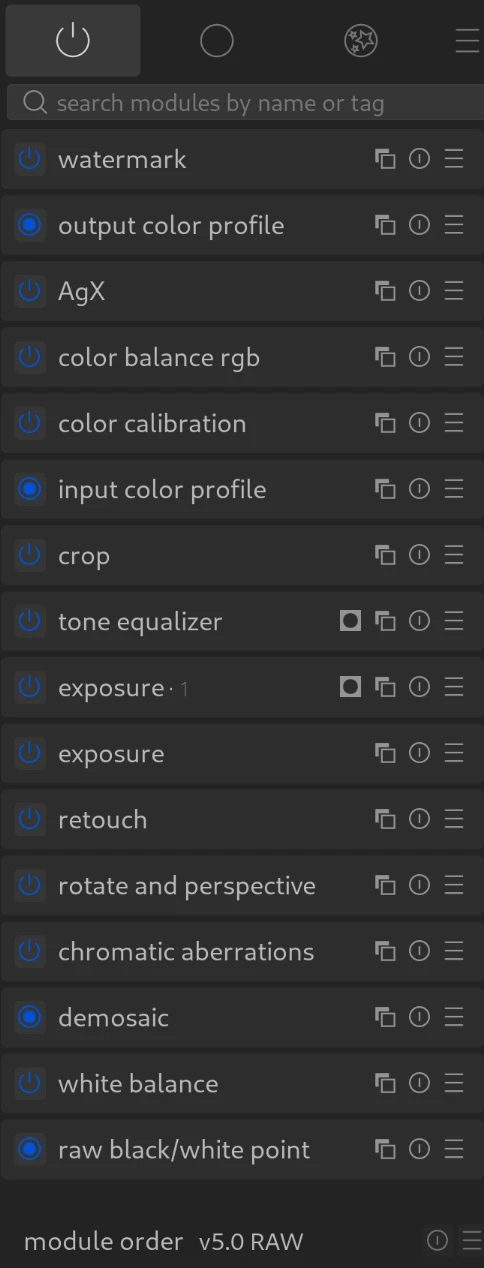
The pixel pipeline (pixelpipe) is the technically defined sequence in which darktable calculates an image from RAW input to finished output.
- Direction: Processing runs strictly from bottom to top. The RAW image starts at the bottom of the module list (not the history stack in the left panel), and each activated module adds a new processing layer on top of it.
- Visual representation: The order of the modules in the right-hand panel (darkroom) corresponds exactly to the order in which they are calculated, bottom to top.
Important: Processing Sequence vs. Result
The order in which you, as a user, apply the modules has no influence on the final result.
- It doesn’t matter whether you set the exposure first and then do the white balance (or vice versa).
- Darktable automatically sorts each step internally into the correct place in the pixelpipe. You can jump to an earlier module at any time and change values; the entire pixelpipe is then simply recalculated with the new values. The history stack (left panel) only shows when you did something, not how it is calculated.
Workflows (scene-referred vs. display-referred)
- Scene-referred (the standard since v3.0):
Works with linear data and is physically correct. Important modules such as AgX are located very late (near the top) in the pixelpipe. This minimizes artifacts and maximizes quality. - Display-referred (Legacy):
The old workflow, which operates non-linearly (similar to classic image editing). Modules such as the base curve intervene very early (near the bottom) in the pixelpipe. - Important: Some modules like watermark or grain are display-referred and are applied after tone mapping. However, they have no influence on image quality.
Changing the Module Order
It is tempting to change the module order to match your workflow order, but that will change the pixelpipe order.
- It is possible to move modules via
drag & drop. - However, this is strongly discouraged unless you know exactly what you are doing. The default order is optimized (e.g., demosaicing must come before the input profile). Changing it can degrade image quality.
For more information, view darktable’s official manual page: “the pixelpipe & module order”.
Questions about this topic? Discuss it with us in the forum!
January 27, 2026