



Want to get started right away? Make it easy for yourself!
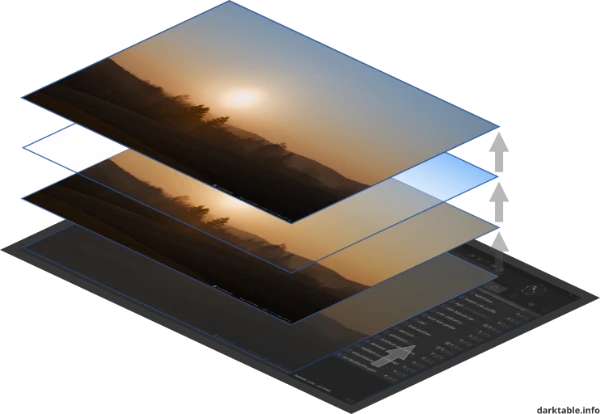
Your Digital Light Table
Imagine a classic light table in a darkroom. The light shines from the bottom up. At the very bottom lies your RAW image – the digital negative. It might look flat and low-contrast, but it is your unchangeable foundation.
The “Slides”
Every module in darktable is like a transparent “slide” that you place on top of this negative:
- One “slide” (module) corrects the exposure.
- Another brings color into play.
- A third ensures sharpness.
You look down through this stack (pixelpipe) from above. The original negative at the very bottom always remains untouched.
The Bottom-Up Principle
This is the most important difference compared to other programs: darktable thinks bottom-up.
The data stream flows like light: It starts at the RAW (bottom), runs through development, then through color, all the way to the output (top).
- Fixed Physics: The order of the slides is predetermined by physical logic. You can’t tile the roof before the foundation is laid.
- Your Freedom: Even though the stack is fixed, you can pull out, swap, or readjust any slide at any time.
Your Tools
- Instances: Need a slide twice? No problem. Simply place the exposure module on the stack a second time (second instance) – once for the background, once for the subject.
- Masks: Cut holes in the slides. This way, an edit only affects where you want it to (e.g., only in the sky).
- History: Every step is logged in the History module. You can travel back in time and undo any mistake.
The Result: A Recipe
In the end, you don’t save a “finished image,” but a recipe. An instruction on how the light should shine up through your slides. This recipe is reproducible at any time, adjustable, and transferable to other images.
About darktable.info
Darktable is a wonderful piece of software, and you’ve just learned the underlying concept. To make your journey forward as easy as possible, we focus on the essentials.
Many tutorials on the web are outdated or unnecessarily complicated. Here, you will learn only the tools that you really need. Simple. Frustration-free.
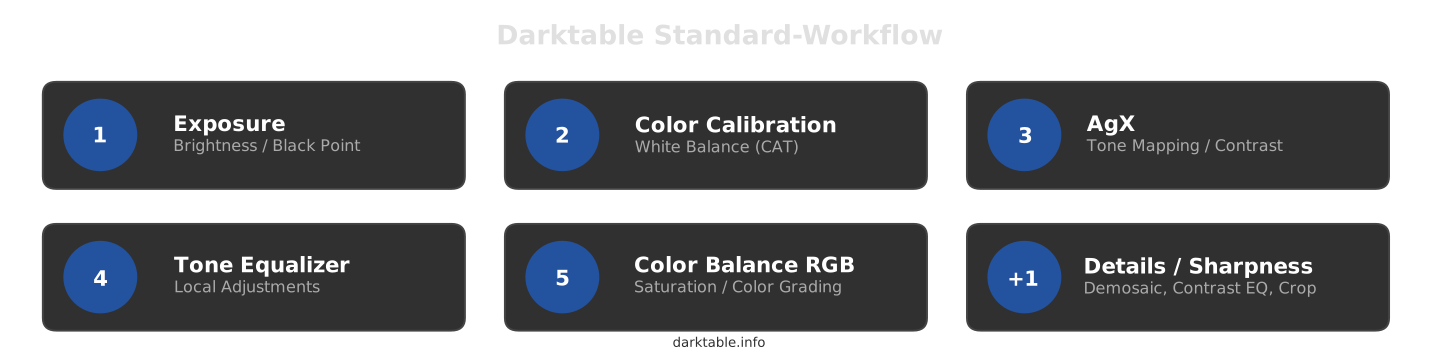
Start now with the Quick Start Guide (if you have no experience with DT yet) or discover the Standard Workflow!
Many thanks for your recent Shortcuts Screen tutorial!!! I barely use them or made any new because it was very confusing for me. Now I will try to get into it with more confidence.
Keep going with this wonderful website!!!
We are glad you find the website useful!
Ciao, ho istallato darktable versione 5.4.0 in Italiano, ma noto che dei pannelli di sviluppo sono differenti dalla versione 3.2.1 in Italiano, ad esempio non trovo più il pannello monocromatico per sviluppo in b/n, non visualizzo più in fase di Camera Oscura sul menù in basso la miniatura della pellicola, e altre particolari nei pannelli di sviluppo, è cambiato qualcosa rispetto alla vecchia versione?
Ciao Carlo!
Non conosco l’italiano, quindi sto usando DeepL per tradurre questo messaggio, spero che abbia senso.
Sì, ci sono state diverse modifiche dalla versione 3.2.1 di darktable. Alcuni moduli sono stati deprecati, come il modulo monocromatico. La maggior parte dell’interfaccia utente dovrebbe essere la stessa, anche se potrebbe essere necessario attivarli con scorciatoie da tastiera: ecco le scorciatoie predefinite: https://darktable.info/en/system-ui-2/shortcuts-keyboard-layout/darktable-shortcuts-default/
Per ottenere un’immagine monocromatica, vai al modulo “calibrazione del colore”, nell’angolo in alto a destra nel menu “pancake” > monocromatico, quindi scegli una delle conversioni in monocromatico.
Thanks Todd for that good job!
I will follow your blog with great interest and share it with my photo club.
Great work on the site…this should really help new users… I didn’t see a section on the scopes. The waveform and vectorscope are really nice and powerful tools and probably should be part of a scopes topic also to show how you can show mark picker selections etc….or maybe a combined section on the color picker and scopes…if I missed it on the site my apologies….
Hello Todd,
Thank you for your messages and suggestions. We will take a closer look at them to see how we can best implement them.
Best regards, Chris
The ‘Other’ tab in darktable with ‘map’, ‘slideshow’ and ‘tethering’ is absent. Could be useful to add, providing an opportunity for others to assist.
This is a great project, providing extremely helpful advice.
Bold, “” and Italics seem to be used interchangeably. It might help the reader if this was more obviously systematic (p.s. I am having trouble with the usual techniques for obtaining bold and italics using Firefox in Windows 11.
Only ‘Home’ and ‘Getting started’ pages have comments sections. Is this intentional? It would be useful to have these sections on all the pages.
Thank you, I will adjust it!
Thanks for the rapid response
The blue and black background does not appear very readable when printing the web pages.
Hi Garry! I have tried with several printing options and when attempting to print I get black lettering on a white background. Have you checked the printing options on the print dialog that appears when first trying to print? Or possibly the printer defaults of your OS? Sometimes toggling either on or off a setting that is attempting to include the background is helpful. Or, have you tried “printing” it to a PDF file (most OS’s printing dialog has a way to print to PDF) and then printing to a printer from the PDF?
A section on the mechanics of submitting suggested edits, on either the help or FAQ pages, would be useful.
Also the Cloudflare robot check works on Chrome, but not Firefox with Windows 11
Hello everyone on this team.
I’ve been working with Linux since 2006 and with darktable on Linux Mint since 2013, and I must say it’s an extremely interesting piece of software.
What you’re doing here is a very good tool for further developing your skills with darktable.
It wasn’t always easy to get the hang of newer features; some videos were helpful, but what you’re providing here is truly excellent and simple! Congratulations!
I’ll definitely continue to follow your website in the future; the darktable documentation isn’t quite up to par for me.
I really appreciate this work, it’s incredibly helpful for novices like me! Thank you, and I look forward to seeing any necessary updates you make to the site.