



What is it about?
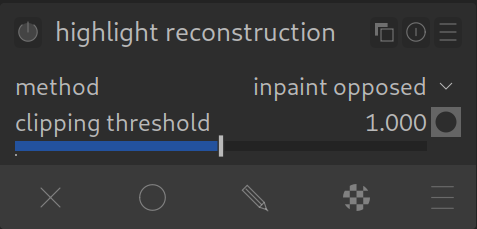
Digital cameras have limits. If an area in the image is too bright (e.g., the sun, bright clouds, or reflections), the pixels “fill up”. The sensor can no longer store data, the area becomes pure white and loses all texture. This is called “clipping”.
This module tries to restore information in these destroyed areas. It is often the last resort before a sky simply looks like a white hole.
The Methods (Important!):
This module offers various mathematical ways to save the data. The choice of method decides between success or failure:
- Inpaint Opposed: The modern standard (default). It is fast, robust, and works well for the majority of images. It restores clipped pixels by using an average of adjacent unclipped pixels to estimate the correct color. Start here!
- Guided Laplacians: The heavy-duty pro mode. Use this if “Inpaint Opposed” fails to recover enough detail (e.g., in complex clouds). It is extremely powerful but computationally intensive. It uses unclipped color channels to guess the structure in the broken channels.
- Clip highlights: The fallback. Everything that is broken is made neutral gray/white. This prevents ugly color casts (e.g., pink clouds) but brings back no details. Use this only if you want neutral white highlights without texture.
How to apply it:
- Activate the module (is usually on by default).
- Look at the brightest spots in the image. Are they just flat white? Or do they have a strange color cast (magenta/cyan)?
- Ensure the mode is set to “Inpaint Opposed” (default). This usually fixes magenta casts immediately.
- Only if you need more structure: Switch to “Guided Laplacians”. You can then play with the “Threshold” slider to determine when the module should intervene.
Reality Check:
What is physically no longer there, even darktable cannot conjure up. If all three color channels (Red, Green, Blue) are 100% blown out, the spot remains white. This module helps where there is still a little bit of information left in at least one color channel.
For more information, view darktable’s official manual page: “highlight reconstruction”.
Questions about this topic? Discuss it with us in the forum!
January 27, 2026
Another round if feedback, how old is this information? We have opposed for quite a long time as default for **very** good reasons.
Hello Hanno,
Thank you very much for your feedback and message.
I have reviewed the manual on this topic and updated the page accordingly.
Best regards, Chris