



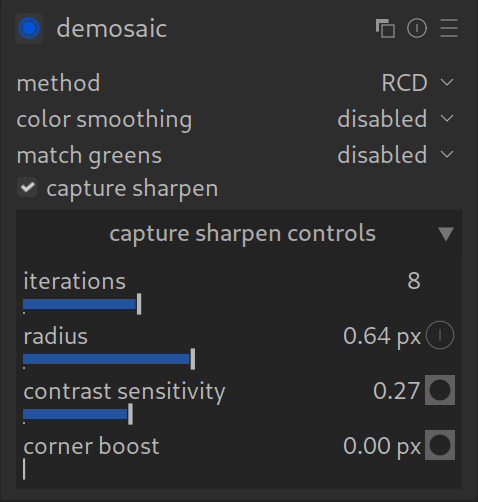
New in Darktable 5.4: Capture Sharpen (in Demosaic Module)
With Darktable 5.4, there is a new, highly efficient method to establish the base sharpness of your RAW files. It is located directly in the Demosaic module.
What is it?
Every digital image is naturally slightly blurry (due to the Bayer filter and AA filter in front of the sensor). Previously, we often corrected this later with the Diffuse or Sharpen module (Preset: Lens Blur).
Now this correction happens directly during the “development” of the raw data (demosaicing).
The Advantages
- Perfect Timing: Sharpening is applied to the raw pixel data before other modules change the image. This minimizes artifacts.
- Performance: It is often faster than a separate instance of Diffuse or Sharpen.
- Simplicity: One checkmark (“Capture Sharpen”) is enough, and your image has a crisp base sharpness.
The Settings
- Iterations: How often is the algorithm run? (Standard 8 is a good compromise between quality and speed).
- Radius: How fine are the details? (Depends on your camera, mostly between 0.8 and 1.3 px).
The New Workflow (Recommendation)
- Step 1 (Base Sharpness): Activate Capture Sharpen in the Demosaic module. This removes the “sensor mush”.
- Step 2 (Creative): Use the Contrast Equalizer or Diffuse or Sharpen only if you additionally want local contrast or a special look.
Conclusion: For 90% of images, this checkmark replaces the elaborate “Lens Deblur” in the Diffuse or Sharpen module.
This is basically a technical revolution for Darktable users. It makes getting started much easier because you no longer necessarily have to understand the complex Diffuse or Sharpen module just to get a sharp image.
NOTE: it is sometimes hard to see that anything has happened when enabling Capture Sharpen. It is easier to see the effects if you take a snapshot before enabling, enable Capture Sharpen, then compare it to the before enabling snapshots (you may have to zoom in to see the effect it has on the image).
For more information, view darktable’s official manual page: “demosaic”.
Questions about this topic? Discuss it with us in the forum!
January 27, 2026