



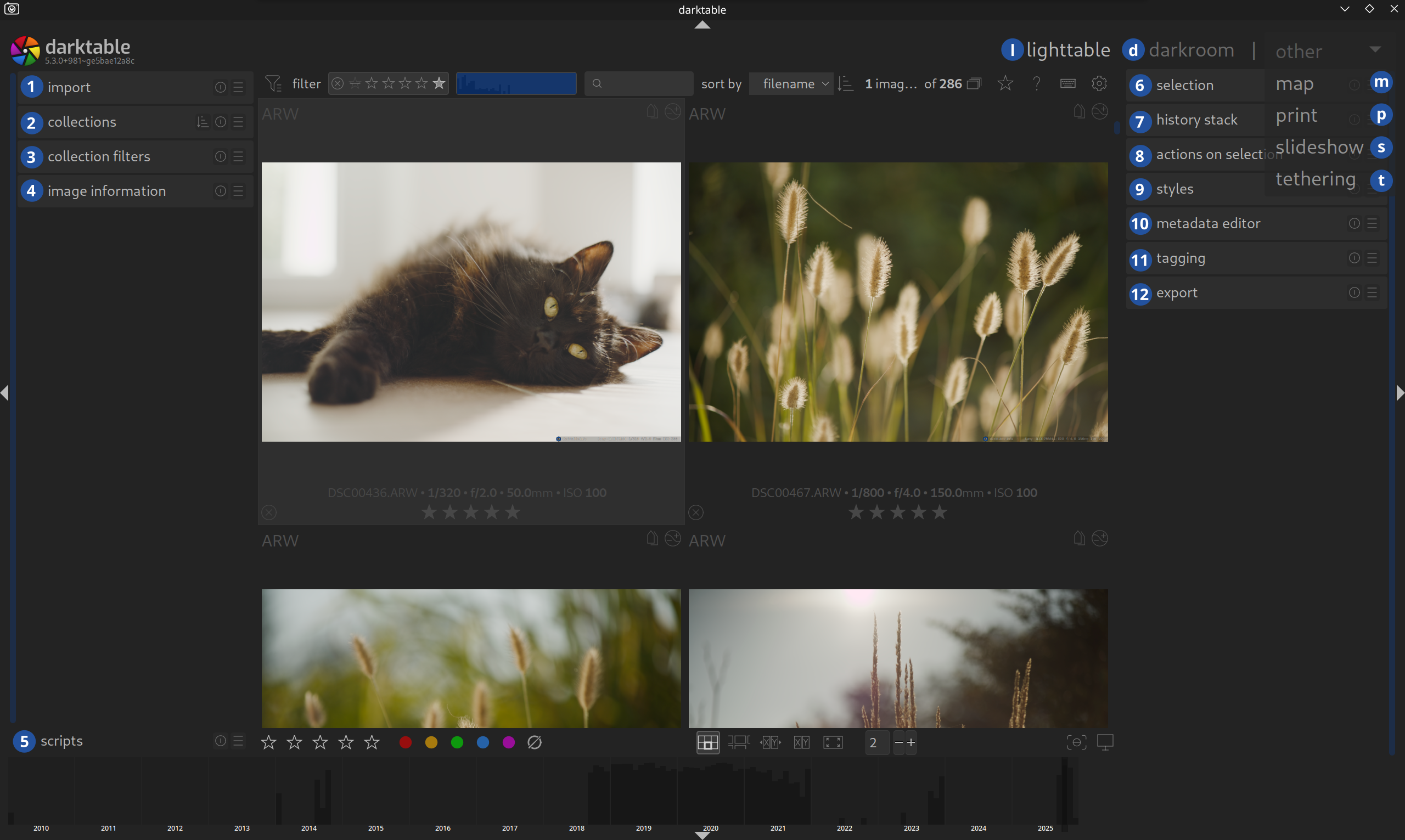
The Lighttable
The Lighttable is your central command center. Every job starts here.
The Screen Areas
There is a very good description of the five screen areas and the different views in the Darktable Manual.
Please take some time to read this!
The Lighttable View
- Top Panel: Contains information about Darktable (version), filters, and access to global settings.
- Left & Right Panels: Contain modules you need for managing and editing your images.
- Bottom Panel: Here you will find the
[Filmstrip]and helpful functions for[culling].
Other Views
When you use Darktable for the first few times, you will mainly use the Lighttable and Darkroom views. However, it is good to know that there are other views to discover, such as Map, Print, Slideshow, and Tethering.
First Steps
When you start with Darktable, the first three modules on the left side are the most important. They serve to:
[Import]your photos.- Find and organize them using
[collections]. - Refine your search with
[collection filters].
All other modules can wait a bit. After exploring these three modules, you will likely want to develop an image in the [Darkroom].
The Central Area
Your filtered images are displayed in the middle part of the screen. You can zoom in (shortcuts), [cull] them, or start [developing]. You can do much more with the images, but this is a good start.
Interactive Overview
All views and modules currently described on this page are numbered in the screenshot, and the numbers are clickable. Anything without a number or letter is not (yet) described.
The Views
- Lighttable (You are here)
- Darkroom (d)
- Map (m)
- Print (p)
- Slideshow (s)
- Tethering (t)
The Modules
Left Panel
- Import (1)
- Collections (2)
- Collection Filters (3)
- Image Information (4)
- Lua Scripts (5)
Right Panel
- Select (6)
- History Stack (7)
- Styles (8)
- Metadata Editor (9)
- Tagging (10)
- Geotagging (11)
- Export (12)
Useful Shortcuts
Shift + H: Show shortcuts helpB: Toggle borders/guides
January 13, 2026
Earlier comment about Bold and italics, applies also to the use of blue text. A consistent approach would help the reader.